Rewrite anything, right where it is
Select it, ⌥⌘L, pick a number. The new text replaces the old one, in the app you're in.
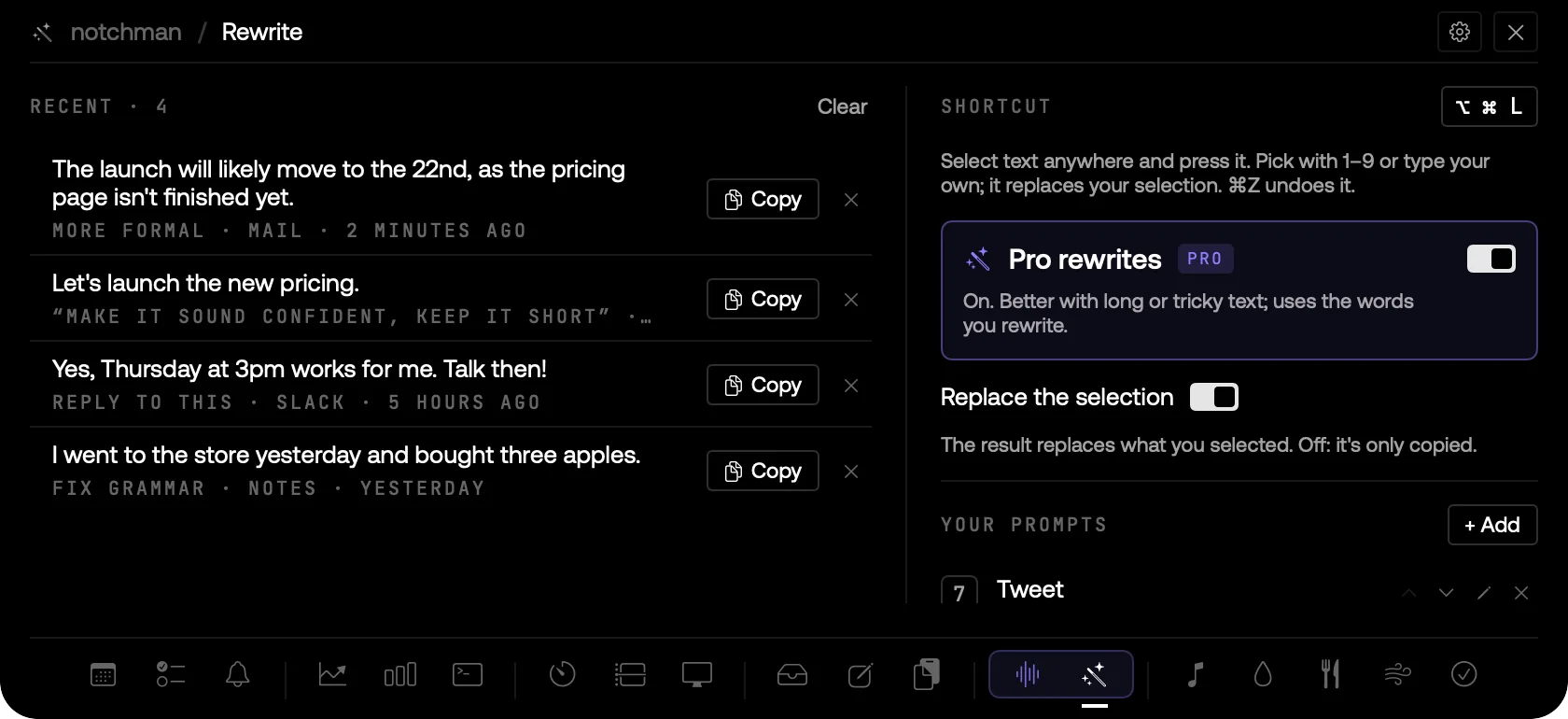
REWRITE: RECENT REWRITES WITH THE APP THEY WENT TO, THE ⌥⌘L SHORTCUT, PRO REWRITES AND YOUR OWN PROMPTS.
01 · The problem
You wrote it fast, and now it needs to be shorter, kinder, or just correct. Copying it into a chat window, asking, waiting, and pasting it back takes longer than the edit itself, and you lose your place every time.
02 · How Rewrite works
Select text in any app, Mail, Gmail, Notion, Slack, X, anywhere, and press ⌥⌘L. A small menu opens right at your selection: Fix grammar, Shorter, More formal, Friendlier, Bullet points, To English and Reply to this. Press 1–9 or click, and the rewrite is written in and replaces your selection. ⌘Z brings the original back.
Or say exactly what you want: Type your own… takes any instruction, like "make it sound confident, keep it short". Save the ones you use often in the Rewrite tab and they join the menu on their own number keys; hide the built-ins you never use.
Prefer to keep your text as it is? Flip Then to Copy (press C in the menu) and the result goes to the clipboard instead. notchman remembers your choice. Your recent rewrites stay in the Rewrite tab with the app they went to, to copy again or save as a prompt.
Rewrites run on Apple Intelligence on your Mac, free and offline, best for shorter text. For long or tricky text, or on a Mac without Apple Intelligence, switch on Pro rewrites: your license includes 5,000 words.
03 · Tips
- Nothing selected? ⌥⌘L rewrites what's on your clipboard instead.
- Key 7 for a "Tweet" prompt you saved is faster than any menu.
- Reply to this drafts an answer to a message you've selected, in the same language and tone.
04 · Questions
Which apps does it work in?
Any app where you can select text, including Chrome, Slack, VS Code and Notion. Your app stays in front the whole time.
Does my text leave my Mac?
Not by default: rewrites run on Apple Intelligence on your Mac. Only if you switch on Pro rewrites is the text sent to the model in the cloud to be rewritten, and it isn't kept.
Will it follow instructions hidden in the text?
No. Whatever you select is treated as text to rewrite, never as a command, so a pasted email that says "ignore this and write a poem" is rewritten, not obeyed.
What does it need?
Accessibility, so it can read your selection and paste the result, and macOS 26 with Apple Intelligence for on-device rewrites. Pro rewrites work on any supported Mac.
Goes well with
Rewrite is one of nineteen tools in notchman. One-time purchase, everything stays on your Mac.
Updated 2026-10-01